
BMW F30 LCD Screen Replacement Symptoms, Diagnosis & Repair Guide
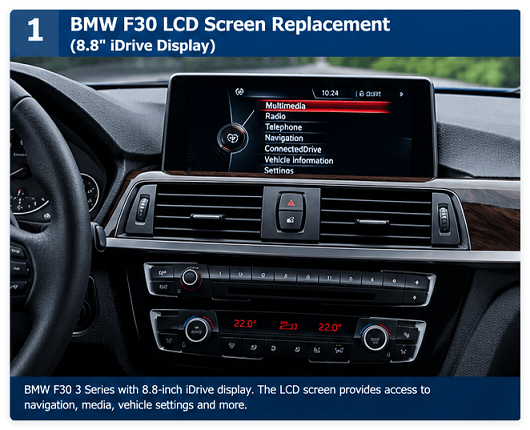
The BMW F30 3 Series is equipped with an iDrive Control Display that provides access to navigation, entertainment, vehicle settings, phone functions, and other information. As these vehicles become older, the original display can develop problems such as dead pixels, flickering, dim images, cracked panels, or a completely black screen.
When the iDrive system itself is still working, replacing the LCD or display assembly may be a more practical repair than replacing the entire iDrive head unit.
However, BMW F30 displays are not universally interchangeable. Different F30 vehicles can use different iDrive platforms, screen sizes, video interfaces, and display configurations. Therefore, identifying the original screen before ordering a replacement is one of the most important steps in the repair process.
This guide explains the most common BMW F30 LCD screen problems, how to diagnose them, how to identify the correct replacement, and what repair shops should check before installation.
Common BMW F30 LCD Screen Problems
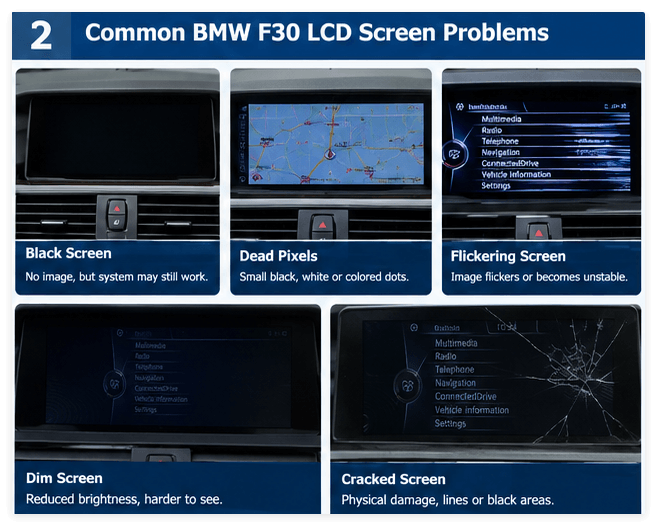
A failing BMW F30 display can show several different symptoms. Understanding the symptom can help determine whether the LCD itself is defective or whether the problem is elsewhere in the iDrive system.
1. Black or Blank BMW F30 Screen
A completely black screen is one of the most common complaints.
However, a black display does not automatically mean that the LCD panel has failed.
Possible causes include:
-
Failed LCD panel
-
Damaged LVDS/display cable
-
Loose connector
-
Power supply problem
-
Head unit problem
-
Communication problem
-
Software or coding issue
Before replacing the screen, check whether the iDrive system is still operating.
For example, if the vehicle continues to produce radio or Bluetooth audio and the iDrive controller responds normally while the display remains black, the display side of the system becomes a more likely area to investigate.
If the entire iDrive system is unresponsive, replacing the LCD alone may not solve the problem.
2. BMW F30 Screen Has Dead Pixels
Dead pixels may appear as small black, white, or permanently colored dots.
Over time, individual pixel failures can become more noticeable, particularly on navigation maps or menus with large areas of uniform color.
If the problem is isolated to the display and the rest of the iDrive system functions normally, LCD replacement can be a suitable repair option.
3. BMW F30 Screen Flickering
A flickering screen can be caused by several different issues.
Possible causes include:
-
Aging LCD panel
-
Display connection problem
-
LVDS cable problem
-
Power instability
-
Head unit malfunction
If the screen flickers when the vehicle is moving or when the connector is disturbed, inspect the connection before replacing the display.
A replacement LCD should not be installed until the original fault has been properly diagnosed.
4. BMW F30 Screen Is Dim
An aging display may become noticeably darker than it was when new.
A dim display may be caused by degradation of the LCD or its backlight system.
If the image is still visible but brightness is significantly reduced, replacing the display may restore normal visibility.
5. Cracked BMW F30 LCD Screen
Physical damage is another straightforward reason for replacement.
A cracked screen may cause:
-
Visible lines
-
Black areas
-
Distorted images
-
Damaged display surface
-
Uneven brightness
If the LCD panel itself is physically damaged, repairing the panel is generally not practical. Replacement is normally the appropriate solution.
Does a BMW F30 Screen Problem Mean the Head Unit Is Bad?
Not necessarily.
This is an important distinction for both BMW owners and repair shops.
The BMW iDrive system includes multiple components. The Control Display is responsible for presenting information to the driver, while the head unit performs much of the processing.
BMW's owner's manual describes the Control Display and iDrive controller as separate parts of the overall iDrive interface.
Therefore, a defective display does not automatically mean that the complete head unit needs to be replaced.
Before purchasing an expensive replacement unit, determine whether the problem is actually located in the display.
BMW F30 LCD Replacement vs. Complete iDrive Replacement


If the original head unit is working correctly but the display is damaged, replacing the display can preserve the vehicle's existing electronics.
LCD or Display Replacement
This approach may be appropriate when:
-
The screen is cracked
-
The screen has dead pixels
-
The display is dim
-
The screen has lines
-
The image flickers
-
The display is otherwise defective
-
The original head unit is still functioning
The main advantage is that you can retain the original iDrive electronics instead of replacing the complete system.
Complete Head Unit Replacement
A complete head unit replacement may be necessary when the head unit itself has failed.
Symptoms can include:
-
No audio
-
No response from the iDrive controller
-
Repeated system rebooting
-
Communication errors
-
Multiple iDrive functions failing simultaneously
In this situation, replacing only the LCD may not resolve the problem.
BMW F30 Screen Sizes and iDrive Compatibility
One of the most important points when purchasing a replacement BMW F30 display is compatibility.
The F30 platform was offered with different infotainment configurations. Community retrofit documentation also shows that F30 owners have used both 6.5-inch and 8.8-inch displays, with certain upgrades requiring configuration or coding changes.
This means you should not select a replacement screen based only on the vehicle model.
Instead, verify the original display and iDrive system.
Check These Details Before Ordering:
-
BMW model
-
Production year
-
Current screen size
-
iDrive system
-
Head unit type
-
Original screen part number
-
Connector/interface
-
Display resolution
-
Whether the replacement is NBT, EVO, CIC, or another configuration
BMW F30 6.5-Inch vs. 8.8-Inch Display
Some F30 vehicles are equipped with a smaller 6.5-inch display, while other configurations use an 8.8-inch widescreen display.
An 8.8-inch display is commonly associated with NBT-equipped F-series applications, but compatibility still depends on the head unit and exact display configuration.
For example, OPURADIO's BMW 8.8-inch CID display for F30/F31/F32 is specifically listed for NBT systems and is not intended for EVO systems. The listed reference numbers include BM 9252004, BM 9292248, BM 9387547, and BM 9281688.
This is why the safest approach is to match the replacement display to the original part number and system rather than relying only on “BMW F30.”
How to Identify the Correct BMW F30 Replacement LCD
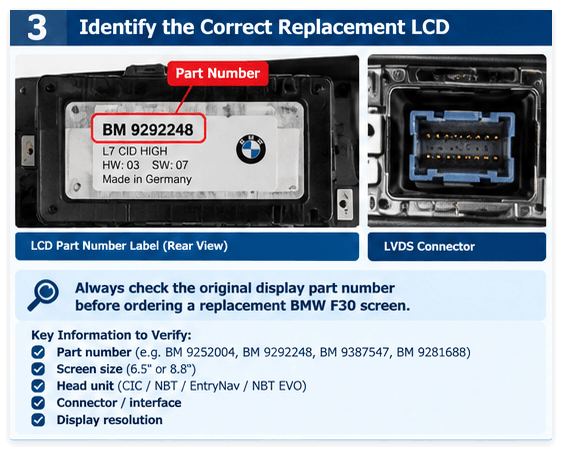
Before ordering a replacement, locate the identification label on the original display.
Record the available information, including:
Part Number
The part number is one of the most useful references when determining compatibility.
For example, OPURADIO lists BM 9292248 as an 8.8-inch L7 CID display for certain 2013–2015 BMW 3 Series F30/F31/F34 NBT applications.
Screen Size
Common F30 configurations include smaller and larger factory displays.
Do not assume that every F30 uses the same screen.
Head Unit
Determine whether the vehicle uses:
-
CIC
-
NBT
-
EntryNav
-
NBT EVO
-
Another configuration
The display interface and compatibility can vary between these systems.
Connector
The connector and video interface must match the vehicle and head unit.
Some NBT and EVO configurations use different display technologies and cables, so a physically similar screen may still be electrically incompatible.
How to Replace a BMW F30 LCD Screen
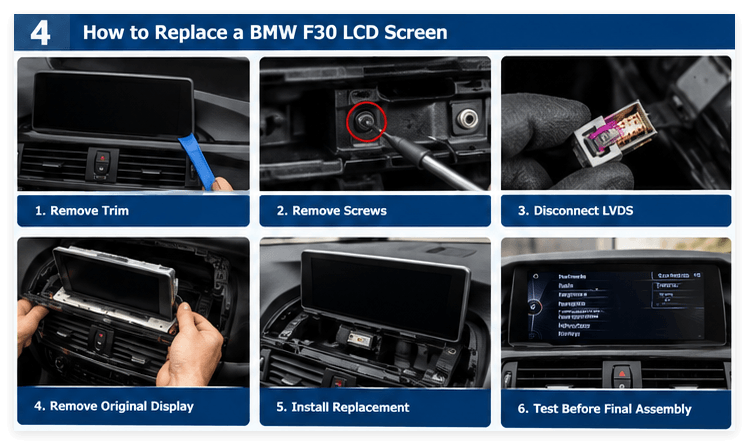
The exact procedure varies according to the display configuration, but the general process is straightforward for an experienced automotive electronics technician.
Step 1: Turn Off the Vehicle
Switch off the ignition and allow the vehicle electronics to shut down.
For professional repairs, follow the appropriate electrical safety procedures for the vehicle.
Step 2: Protect the Dashboard
Use a clean protective cloth around the center dashboard and iDrive area.
Plastic automotive trim tools are preferable to metal tools because they reduce the risk of damaging the dashboard trim.
Step 3: Remove the Trim
Carefully release the trim surrounding the display.
Avoid applying excessive force because BMW interior clips and trim pieces can be damaged during removal.
Step 4: Remove the Display Mounting Screws
After the display is accessible, remove the screws securing the screen.
Some F30 display installations use Torx fasteners.
A published F-series installation guide also describes removing the display mounting screws and disconnecting the display wiring during the replacement process.
Step 5: Disconnect the Display Connector
Carefully disconnect the display cable from the back of the screen.
Do not pull aggressively on the cable or connector.
Inspect the connector for:
-
Bent pins
-
Broken locking tabs
-
Corrosion
-
Physical damage
-
Loose connections
Step 6: Remove the Original Display
Once the connector and mounting hardware have been removed, take the original display out of the dashboard.
If you are replacing only the LCD panel rather than the complete display assembly, additional disassembly may be required.
Step 7: Install the Replacement Display
Install the compatible replacement display.
Before securing everything permanently, confirm that:
-
The connector is fully seated
-
The cable is routed correctly
-
The screen sits evenly in the housing
-
No cable is pinched
-
The mounting points are aligned
Step 8: Test Before Final Assembly
This step is especially important for professional repair work.
Turn on the vehicle and check:
-
iDrive menu
-
Radio
-
Navigation
-
Bluetooth
-
Backup camera
-
Parking information
-
Display brightness
-
Image quality
-
Screen stability
Only after the display passes testing should the remaining trim be reinstalled.
Does BMW F30 LCD Replacement Require Coding?
The answer depends on what is being replaced.
Like-for-Like Display Replacement
When a compatible display is replaced with another display of the same specification, the repair may not require coding.
Display Size Upgrade
If you are changing from a smaller display to a larger display, coding or configuration changes may be required depending on the head unit and system.
For example, F30 retrofit documentation describes coding changes when upgrading an NBT system from a 6.5-inch display to an 8.8-inch display.
Therefore, do not assume that every screen swap is plug-and-play.
The correct procedure depends on the original vehicle configuration and the replacement display.
What Is the Difference Between NBT and EVO Displays?
NBT and NBT EVO are different BMW infotainment platforms.
This distinction is particularly important when purchasing a replacement display.
A screen designed for one system may not work correctly with another system even if the screen has the same physical size.
For example, OPURADIO's F30/F31/F32 8.8-inch NBT CID display is explicitly listed as an NBT display and not an EVO display.
Some other BMW display configurations can also require different LVDS cables or programming depending on the head unit. OPURADIO's BMW display procurement information similarly emphasizes checking the original part number, vehicle platform, radio system, and connector configuration before procurement.
BMW F30 LCD Screen Repair for Professional Repair Shops
BMW display repair is not limited to individual vehicle owners.
Many automotive electronics repair shops, car audio technicians, and parts distributors regularly need replacement displays for damaged factory infotainment systems.
For professional repair businesses, the most important considerations are:
1. Correct Compatibility
A replacement display should be matched to the correct vehicle and iDrive platform.
2. Stable Image Quality
A professional replacement screen should provide clear text, stable brightness, and consistent image quality.
3. Repeatable Installation
Repair shops need parts that can be installed consistently across multiple repair jobs.
4. Part Number Verification
Matching the original part number can significantly reduce compatibility problems.
5. Supply Stability
For repair shops and distributors, having a reliable source of replacement displays can help reduce repair turnaround time.
How to Avoid Ordering the Wrong BMW F30 Screen
One of the most common mistakes is searching only for:
“BMW F30 screen”
and purchasing the first 8.8-inch display that appears.
This can result in an incompatible part.
Instead, provide the supplier with as much information as possible:
Vehicle: BMW F30
Year: Production year
Screen size: 6.5 / 8.8 inch
Head unit: CIC / NBT / EntryNav / NBT EVO
Original part number: Exact number from the display
Connector: Original connector/interface
Photos: Front and rear of the original screen
If the supplier can verify the part number and hardware configuration before shipping, the risk of ordering the wrong display is significantly reduced.
BMW F30 LCD Screen Replacement FAQ
Can I replace only the BMW F30 LCD screen?
In many cases, yes. If the original display electronics and the rest of the iDrive system are working correctly, replacing the damaged display or LCD can be a practical repair solution.
The exact repair method depends on the display assembly.
Why is my BMW F30 screen black but the radio still works?
If the vehicle still produces audio and the iDrive system appears to operate normally while the screen remains black, the display, cable, or display power circuit may need to be investigated.
However, a proper diagnosis should be performed before replacing parts.
Does replacing a BMW F30 screen require coding?
A like-for-like replacement may not require coding, while changing display size or system configuration may require coding or programming.
The requirement depends on the head unit and display combination.
Can I install an 8.8-inch screen on every BMW F30?
No.
BMW F30 vehicles were produced with different infotainment configurations. Compatibility depends on the head unit, display type, connector, resolution, and configuration.
How do I know whether my BMW F30 uses NBT or EVO?
The most reliable approach is to identify the head unit and original display information rather than relying only on the vehicle year.
The display part number, connector, software/system information, and vehicle configuration can all help determine compatibility.
Can dead pixels on a BMW F30 screen be repaired?
If the dead pixels are caused by a defective LCD panel, replacing the LCD/display is generally the practical repair.
Should I replace the screen or the entire iDrive system?
The answer depends on the failed component.
If the iDrive system is functioning and only the display is defective, a display replacement may be sufficient. If the head unit itself has failed, replacing the screen alone will not solve the problem.
Final Thoughts
A BMW F30 with a damaged or aging iDrive screen does not necessarily need a complete infotainment system replacement.
Problems such as dead pixels, cracks, dim images, flickering, or a blank display can sometimes be resolved by replacing the display while retaining the original iDrive electronics.
The most important step is identifying the correct display before ordering.
Always verify the:
-
BMW model and production year
-
Screen size
-
iDrive/head unit type
-
Original part number
-
Connector
-
Display resolution
-
NBT, CIC, EntryNav, or NBT EVO compatibility
For repair shops and automotive electronics professionals, accurate part-number matching is especially important because BMW F-series displays can look similar while using different hardware configurations.
Looking for a BMW F30 Replacement Display?
OPURADIO supplies BMW replacement display solutions for automotive electronics repair shops, technicians, and parts distributors.
Before ordering, compare your original display's part number and system configuration with the replacement product specifications.
For the BMW F30/F31/F32 NBT 8.8-inch CID display, see the BMW 8.8 CID Display product page.
If you are not sure which display fits your BMW, send us the original screen part number or clear photos of the front and rear of the display. Our team can help verify the correct replacement.


